Hi! My name is Ajit, and I’m a MacBook Bro.
Five years ago, if someone had predicted that I would be writing this article, I would have laughed at them. Since 2007, my “tech stack” has been Linux Ubuntu and Windows, coupled with Android phones from 2012 onwards.
For years, I’ve had a sort of lifecycle with my PCs – I get a Windows device, and in a few years, when Windows no longer works well on it, I put Ubuntu or Mint on it and use it until I donate it. This worked very well for me, as I’ve been able to divide my usage based on the specific characteristics of these operating systems. I used Windows more for work-related stuff, and Linux for media consumption and general use.
My journey with Apple started in 2022 when I received the iPhone 13 as a birthday gift. After initial niggles of getting used to the new operating system, I began to enjoy the experience, and in light of increased digital safety concerns, I’ve begun to appreciate the security that IOS offers. In 2024, I got my next Apple device – Airpods Pro 2 – that I used with my phone to listen to music and take calls. The Airpods Pro 2 was perhaps my most life-altering purchase of the decade, as I discovered the joys of Active Noise Cancellation. Working from home – forty feet above a noisy expressway, I began to appreciate what silence does for my nervous system and my ability to focus.
There was no turning back at this point. In 2024, when my Samsung tab was ready to be replaced, I got a used M1 iPad Pro and got sucked deeper into the ecosystem. The stable and secure OS, brilliant user experience, and exquisite “hand-feel” made it my go-to device for reading, media consumption, and even music – as I was able to listen to Spotify through my Hybrid tube-amp setup.
I guess that everyone who gets an apple device begins to experience this “Apple creep” when you begin replacing devices in your ecosystem with Apple products one by one. At this time, my main work computer was a Lenovo Legion gaming laptop that I used at home with an external monitor. For travel, I used a Lenovo Thinkpad T490 with an i7 processor.
But for me the decisive moment came in August 2024. I was on the road, working out of a hotel room with very poor Wifi. I had a couple of important contracts to review, and suddenly found the Documents Folder on my Thinkpad to be empty. I panicked. In a frenzy, I was about to buy a new laptop to set up a Kali-based data recovery lab in my hotel room, when the files reappeared. I soon discovered that sometime during 2023, Microsoft decided that all my documents would be safer in OneDrive, and backed them up without informing me. At the same time, all documents that I created and saved in what I thought was the Documents folder on my laptop, were actually being saved in the cloud, without a local copy! I didn’t realize this when I worked from home, because I have dual high speed broadband connections, but this became truly problematic for me on the road when Wifi, even in the nicer hotels, was spotty. Microsoft Office had this dark pattern where the My Documents folder that you accessed through the apps was actually the one in the cloud, and the option to change this was buried deep in the settings.
I was done.
At this point, my Lenovo Legion was coming up on four years, and despite regular fan cleaning, had begun to scream like a Formula 1 car when I was on zoom calls. I spent the next few months trying new things to get another year out of the Legion – memory upgraded to 64 GB, hard drives upgraded to a total of 2 TB, but it didn’t help much. The writing was on the wall.
Let me now set the context with what my current usage is like. I work from home, as the Compliance Officer for a Dutch technology company that operates in a niche industry segment. While my day-to-day duties are not related to software development or engineering, I am on a learning path to understand more about my industry and sector, so I do a lot of online courses and a little bit of programming. I occasionally use resource heavy tools like Figma. I am also a rapidly evolving AI user, and use Cursor connected to git repositories for a lot of my work needs. As a photography enthusiast using two high megapixel digital cameras among others, I also process a lot of heavy RAW images. I also use Cursor and Claude AI for a lot of personal projects.
Since I started working from home in December 2023, I have been trying to build a work setup that is comfortable, and supports deep focus and long hours. Everything from desk space, to devices and accessories have gone through several iterations.
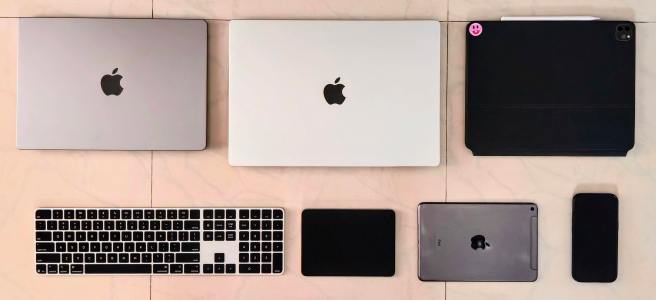
In March 2025, I bought the M4 Macbook Pro. Within the first week of owning the laptop, I was absolutely smitten by the design and tactile experience. I can open it with one hand. The keys, though lacking the travel I am accustomed to with decades of Thinkpads, are a joy to use. Face ID and Touch ID are instantaneous. The software is zippy – even with 24 GB RAM, it does so much better than the Thinkpad. The Nano texture screen works perfectly in my home office – that receives natural light from two directions. I am able to run two 27 inch 4k/60hz displays in addition to the laptop screen without spinning up the system fans. And when the fans do spin up – with 7 Cursor agents and a Zoom call, the laptop is absolutely silent. Not even a whisper. Most of all, I enjoy the experience of bringing together my iPhone, iPads, and Airpods.
Another pleasant surprise is the battery life. While the Lenovo laptops I have owned in the past make bold claims relating to battery life, I rarely got more than four hours of use from a Thinkpad’s so-called all-day battery, and about two hours from the Legion. The one time that I tested the Macbook Pro’s battery life, I got 14 hours of use from a single charge, with 6% battery still left!
As an amateur photographer, I also got to experience the raw power that this laptop brought to image processing. The 36 and 45 megapixel RAW files from my Nikon Cameras edited smoothly on the MacBook Pro with hardly any lag. I also found that it effortlessly handled complex operations like batch processing and image stacking, which would raise noise and fire concerns with my Lenovo Legion.
The only thing that became apparent to me was that I had erred in choosing the 16 inch model. With two 4K monitors working without any issues, I could actually work with the laptop closed, and the 16 inch form factor, though less bulky than my Legion, was still unwieldy to carry around, especially for travel. Around this time, I learned that my Thinkpad T490, despite the i7 processor and 64 GB RAM, would not be upgradeable to Windows 11. The timing was fortuitous. A used 14 inch MacBook Pro with the M1 Pro chip and 32 GB RAM showed up on a local marketplace. It was in good condition, with 96% battery health. The price was good, so I bought it. My mind was blown for the second time. For most of what I did on a day-to-day basis the performance of the M1 Pro was almost indiscernible from the M4 Pro. As one of my colleagues had commented when I was mulling my earlier purchase, I had actually gone a bit overboard with the M4 Pro. With the smaller laptop, I still got about 10 hours of battery life with my typical use.
One thing that was a pleasant surprise was sound quality. Until now, I always regarded laptop speakers as a token inclusion. They put out some sound, that was alright, but they never really delivered an experience. For several years now, I’ve listened to music via wired IEMs and my current music setup comprises the Sennheiser HD 600 powered by a hybrid vacuum tube amplifier. With the MacBook Pro, things were completely different. The speakers on my 16 inch MacBook Pro are brilliant – they can fill the room, and have fantastic definition. The music experience doesn’t end there. The headphone jack on the Macbook Pro is able to competently drive my HD 600 headphones that have 300 ohms impedance. In conjunction with the Xdoou MH02 vacuum tube amp, it completes my audio needs for music and digital content.
Not everything went well though. After 25 years on Windows, I had to re-learn keyboard shortcuts for most of my tools. I also discovered that text navigation shortcuts work differently in different programs, and this is something that I still struggle with.
Now, about a year in on my journey with MacBook, I’m definitely a Macbook Bro and close to becoming an Apple fanboy. Working with the laptop closed most of the time, I decided to invest in the Apple Magic Keyboard so that I can use Touch ID to unlock my system. I also have the Magic Trackpad that is a joy to use, but a bit impractical with two 4k monitors. I’m learning the gestures though, and will soon be adept at them. The only relics from my old system remain the MX Master mouse, and my two 27 inch monitors.
I am on a bit of a roadmap though. With the new Studio Display released this year, I am tempted to get one for image editing, but this is where the Apple tax is beginning to bite, as monitors with better technical specifications are available from Benq and LG for half the price. However, when you reckon the milled aluminium body and unique stand as pieces of ingenious product design and workmanship, the premium doesn’t feel all that unjustified. There’s also the integration with all Apple devices that makes the choice easier.
From within the Apple ecosystem, there seem to be some deficiencies that prevent people from making the most of their Apple hardware. Nowhere is this more painfully apparent than docking stations. This is important, because my M4 Pro supports up to two external displays up to 6k resolution and blistering data transfer speeds. Furthermore, many people who use MacBook Pros for work do so with additional peripherals like Keyboards, mice, pen-tablets, stream decks, and external webcams. Right now, the flagship docking station for Apple is the Caldigit TS5. It would be great if Apple releases an iDock docking station that uses the company’s design language and has a Touch ID button. The iDock should also offer additional ports for displays and wired peripherals. With the Caldigit TS5 Plus retailing at USD 499, Apple could get away with pricing their dock at USD 999. With Thunderbolt technology getting an update every four years or so, a four-year refresh cycle could work perfectly for the iDock.
Another useful peripheral would be an iTouch dongle for those who use their Macbook while closed, with an external display and wired keyboard. While the Magic Keyboard is extremely good for a low-profile keyboard, there are those who need the ticking of a mechanical keyboard. With the new MacBooks becoming increasingly popular with developers these days, Apple may actually find the iMech, a mechanical keyboard, to be a profitable product. The upside is that iTouch dongle and iMech refreshes need not be yearly, they could just hang around the iStore indefinitely like the USB-C to 3.5 mm headphone jack adapter.
It’s been a remarkable journey from being a Windows hostage and Linux rebel to now firmly embedded in the minutely engineered world of Apple, and there is a lot more ahead.
 Zudik.com